







In this guide, we will explain how to add domains to your hosting account using cPanel. Before you begin, make sure that your hosting package supports multiple domains. If your package only supports one domain, upgrade to a suitable package.
Managing multiple websites using cPanel is simple and easy, and does not require any special knowledge of server maintenance. If you have purchased a reseller hosting package from us, you can add unlimited domains to the server. When you purchased the hosting package, you had to specify a domain to work with. This is the main domain with which the package was configured. If you want to add additional domains to your storage, you can do so as follows:
- First, make sure that the domain is configured with the correct DNS for your website hosting.
- On the main cPanel screen, click Addon Domains (you can use the search bar to find the function).
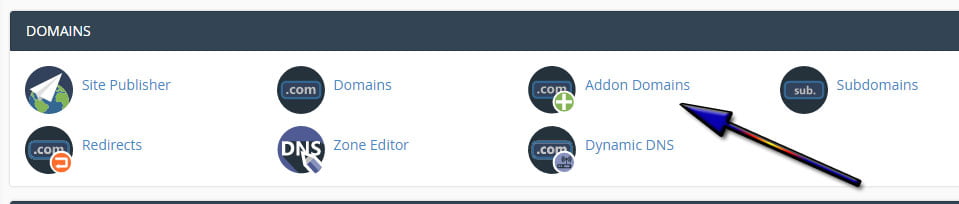
- After clicking, you will be taken to a screen with several fields that you must fill in.
- In the New Domain Name field, enter the additional domain (without http or www). For example: mywebsite.com.
- The Subdomain field will be filled in automatically with the domain name (without the extension). You can change the name if you want, but it is better to leave the original domain name to avoid confusion.
- In the Document Root field, which is also automatically filled in with the full domain name (with the extension), you can set the name of the folder where the site will be stored, as well as its location. Usually, the folder will be added to the server's main folder (usually called public_html).
- Below the Document Root field, there is a checkbox that allows you to create an FTP account associated with the domain. By default, this option is unchecked.

- Click Add Domain. If you have configured everything correctly, you will receive a confirmation message: The addon domain "xxx.com" has been created.
- Now you can access the file manager in cPanel, upload files to the appropriate folder, and start managing your website on your additional domain.




