







Websites are a constant target for hackers and hacking attempts. Hackers may aim to steal information, disrupt server activity, or plant malicious code on the site. In addition to hackers, there is also a lot of traffic from bots and scripts that scan our site. This is usually reasonable activity, but there are crawlers that "run wild" on the site, causing heavy loads and impairing the site's performance. There are many ways to protect your website, and one particularly good way is to block IP addresses.
Every computer connected to the internet has an IP address, and every website on the internet has one too. Sometimes IP addresses are static (for example, when we browse from work, it's likely to be the same IP address), and sometimes they change when we reboot our home router. Your website's IP address depends, of course, on your web hosting service, and it remains constant, making every website a stationary target for hackers.
In the day-to-day management of your website, it is unlikely that you will constantly check which IP addresses are connecting to your site. There are many addresses that connect to the site at any given moment - from human users to bots that scan the site for search engines. Usually, it doesn't matter what the IP address of everyone who enters the site is, except when you want to perform geographic segmentation and see where the users of your site live.
How can you see which IP addresses are connecting to the site? You can see these addresses in your hosting server's logs by logging into the control panel. Use the search field and type Raw Access. On this screen, you can download text files containing the logs of all connections to the server in the last few hours. The system deletes the files every few hours, but you can activate an archive on this screen and keep long-term records for security or data analysis purposes.
Blocking IP addresses - preventing access to the site
If you have checked the logs and found suspicious or problematic activity (such as multiple attempts to access the management screen, excessive and multiple loading of resources on the site, etc.), you can block the specific IP address from which the activity originates. Copy the address from the log, then go to the control panel and search for IP Blocker.
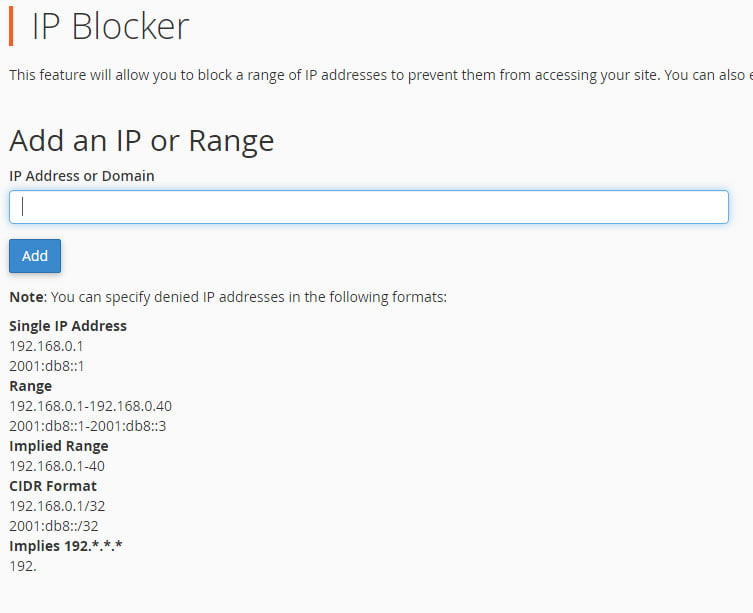
On this screen, you can see if there are any blocked IP addresses and add additional addresses as needed. Paste the IP address you copied from the log and click Add.
On the blocking screen, you can also choose to block a range of IP addresses. For example, if you have a website in Hebrew that is hosted in Israel, you probably don't need traffic from China or Uzbekistan. You can block visitors from these countries altogether (here, for example, are lists of IP addresses by country), thereby reducing risks and improving website security. Blocking a range of IP addresses can be done in one of three formats:
- Blocking a specific range: 192.168.0.1-192.168.0.40
- Blocking a specific implied range: 192.168.0.1-40
- Blocking in CIDR format by: 192.168.0.1/32
If you are unsure how to perform a blanket IP block, we recommend consulting a server maintenance professional or contacting your website hosting customer service. If you accidentally block too many addresses, you may prevent legitimate visitors from accessing your website.
A secure website hosting service will provide you with a first line of defense against dangerous IP addresses. Server firewalls, antivirus software, and other security software automatically detect attacks on servers and block IP addresses accordingly.
IP addresses that are blocked on the hosting server will not be able to access or view the website, and of course will not be able to directly access the data and information on the hosting server.




